In a lot of small shops, getting cabinets onto the CNC means two programs: one to design the cabinets and a second to turn the parts into toolpaths. That's two things to learn, two things to pay for, and one more place for a mistake to slip in between them.
CabinetFORGE does both. You draw the kitchen, and the same app nests the parts, sets the cut order and writes the G-code for your machine.
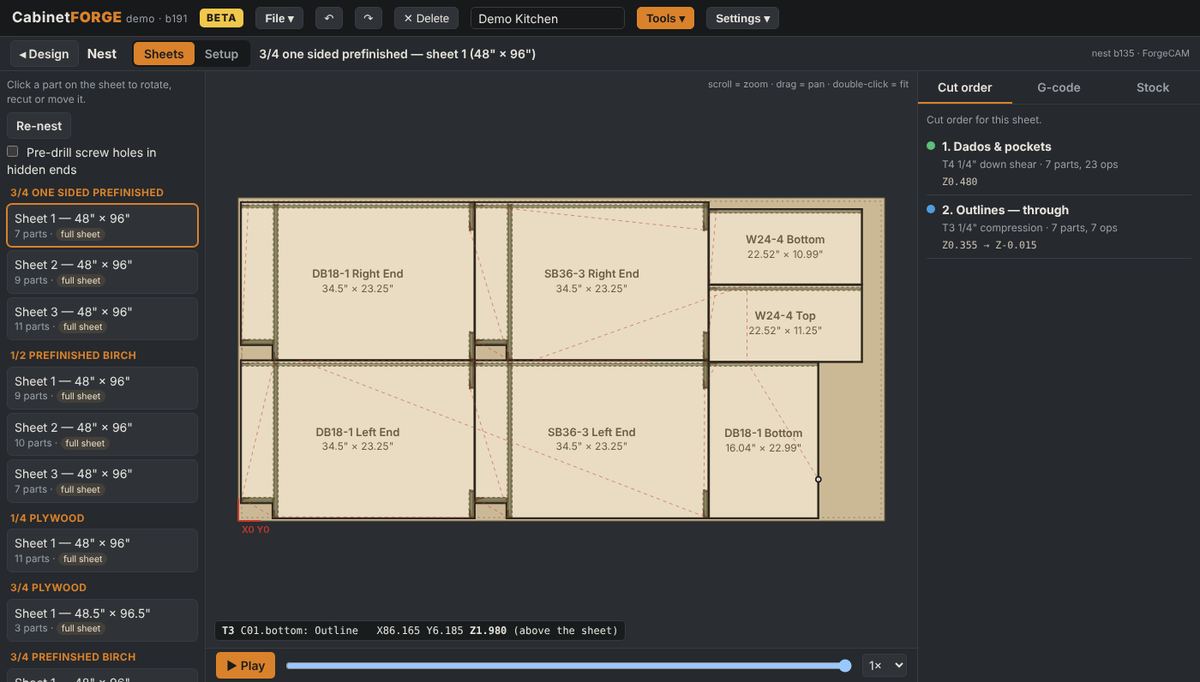
What happens after you draw the kitchen
- Every part, from the cabinets you drew. Ends, bottoms, backs, stretchers, face frame parts, doors and drawer boxes, sized from your shop settings.
- Nested by material. Your 3/4 prefinished, 1/2 prefinished, plywood and so on each get their own sheets, with the sheet count in front of you.
- A cut order that makes sense. Dados and pockets first, outlines last, so parts stay put while they're being machined. You can pre-drill screw holes in the hidden ends too.
- G-code for your machine, one file per sheet, from a post processor set up for your controller.
- Watch it cut first. Press Play and the toolpath runs on screen before you run it on the machine.
- Part labels included, so every part coming off the table has a name.
Why one app matters
When design and CAM live in different programs, a change to a cabinet means exporting again, importing again and re-checking the toolpaths. In CabinetFORGE, change a cabinet and the parts, the nest and the G-code all follow it. Nothing to send between programs.
The 3D view and the cut parts come from the same numbers. If the drawing looks right, the part is right.
Questions
Does CabinetFORGE make G-code for my CNC?
Yes. It writes the G-code itself, one file per sheet, through a post processor for your machine's controller.
Do I need VCarve or another CAM program?
No. Nesting, cut order and G-code are all built into CabinetFORGE.
Does it nest different materials separately?
Yes. Each material gets its own sheets, so prefinished, plywood and other stock are nested on their own.
Get on the launch list
One email when CabinetFORGE is ready. Nothing else, and your address goes nowhere.