I took CabinetFORGE to a woodworking trade show this fall and let people put their hands on it. The interest was enormous, and most of it came from small shops like mine: one-man and two-man shops with a CNC and too little time.
The thing I heard most wasn't about price or features. It was this: the software I have is too hard to learn. Shop after shop said the same thing. Every little guy feels exactly the way I do.
Simple on top, power underneath
The rule I build CabinetFORGE by is that it should do the job in the fewest steps, and make smart choices for you when you're new. When you need more, the power is there, one level down, not in your face on the first screen.
- Set up your shop once. How you build boxes, your door and drawer styles, your hardware, your toe kick. Every new job starts from it.
- Pick a room layout and start placing cabinets from the library. Drag them, snap them to walls, change sizes by typing a number.
- Change your mind any time. Settings, styles and sizes can all change later, and the parts follow.
See the cabinet, not just a drawing of it
Cabinet makers are visual. It's aggravating to be told "it'll be fine, it's just the drawing." In CabinetFORGE, the drawing is the part. What you see is what gets cut.
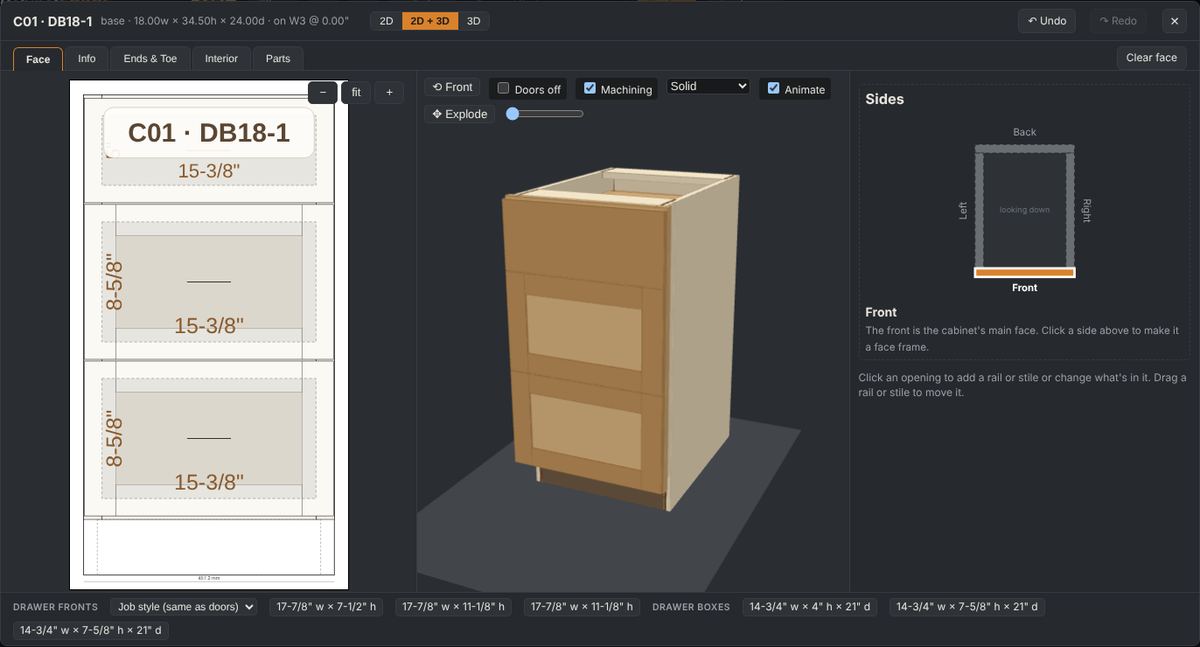
Open any cabinet and you get the face frame, a 3D model you can spin and explode, and the drawer front and drawer box sizes right there. No digging through menus to find out what size something is. Drag a rail or stile and the doors and drawer fronts move with it.
Visitors at the show kept coming back to that 3D cabinet view. More than one told me their current software doesn't do that for them.
Built by a shop, for shops
I came to cabinetmaking as a frame-and-finish carpenter and taught myself the rest. CabinetFORGE is built around how my shop actually works, and the shops that use it will tell me what goes in next. If something is confusing, that's a bug, and I want to hear about it at info@cabinetforge.app.
Questions
How long does CabinetFORGE take to learn?
It's built so a small shop can be designing real cabinets the first day. Shop setup takes a few minutes of questions, and every job starts from it.
Can I see a cabinet in 3D while I design it?
Yes. Every cabinet opens with a 3D model next to its face drawing, and the whole room can be viewed in 3D too.
Does CabinetFORGE do face frame cabinets?
Yes, face frame and frameless both.
Get on the launch list
One email when CabinetFORGE is ready. Nothing else, and your address goes nowhere.