If you run a custom cabinet shop, you already know the software headache. To get one kitchen or one vanity from a room measurement to parts coming off the router, you stitch together two or three programs, pay thousands up front, keep track of a Windows-only security dongle, and brace for another "annual maintenance" price increase every year.
I'm a working cabinetmaker, and I got tired of it. So I built CabinetFORGE.
CabinetFORGE is browser-based cabinet design, laminate countertop estimating, sheet nesting and CNC CAM in one place, built for real shops. The soft launch opens at the end of November 2026, ahead of showing it at Wood Pro Expo Texas in Dallas in May 2027.
Here is what makes it different.
1. Room layout to router G-code in one browser tab
There is nothing to install, no Windows-only workstation and no USB dongle to lose. Open a browser tab, start a job from your saved shop setup, add the customer's notes and field photos, and build.
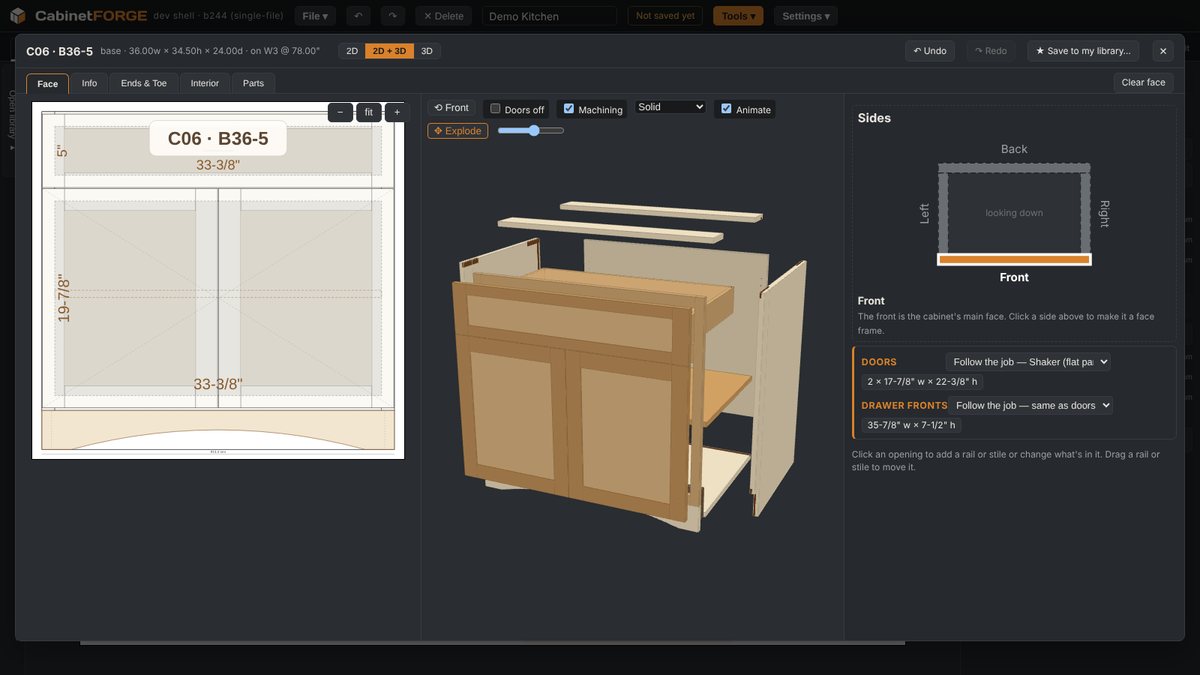
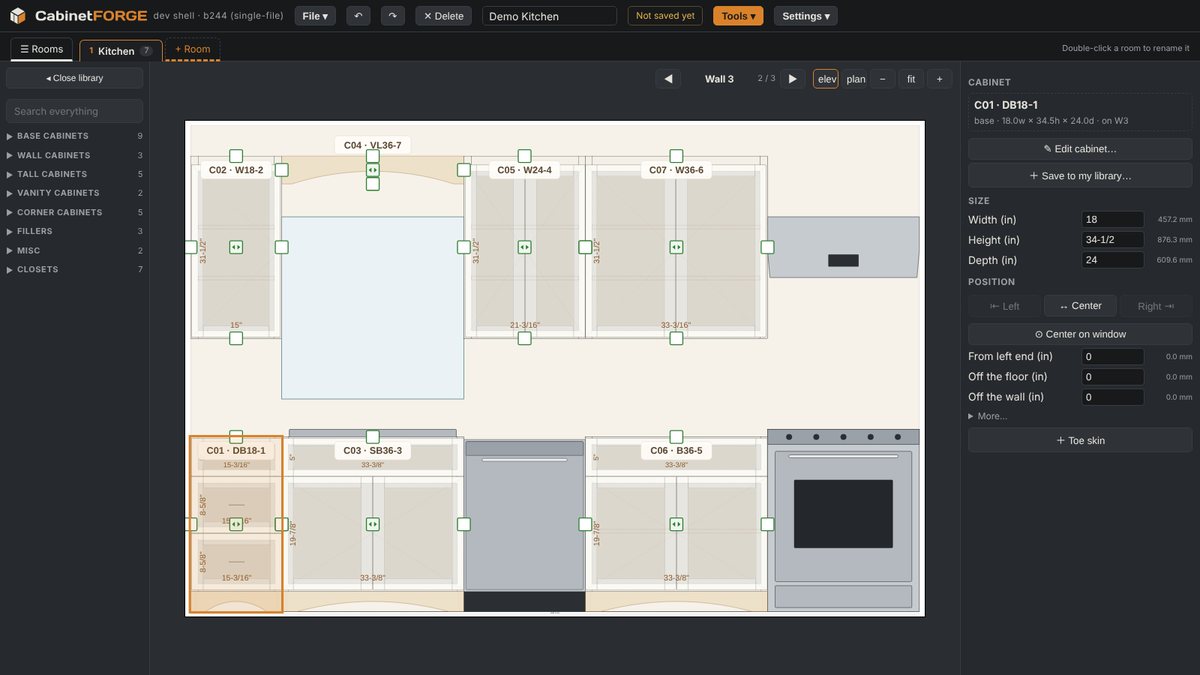
- Face frame and frameless. Full overlay, half overlay, inset and frameless construction. Every number switches between fractional inches and millimetres.
- Odd-shaped boxes. Shape a cabinet from the top view and the box is cut to that shape. Odd-angle corners come out labelled for the table saw bevel.
- The dress-up parts. Fillers, valances and decorative toe kicks are in the library, and a sink base centres on a window with one click.
- See the joinery before you cut it. Pull a cabinet apart with the explode slider, switch to see-through or lines, or take the doors off the whole room and look inside. Dados, shelf pins and hinge cups are drawn right on the parts.
- No CNC? No problem. Tick "Butt joint, no dados" and the whole job switches to clean cut sizes for a table saw and a pocket-hole jig.
2. Countertops and laminate, estimated for you
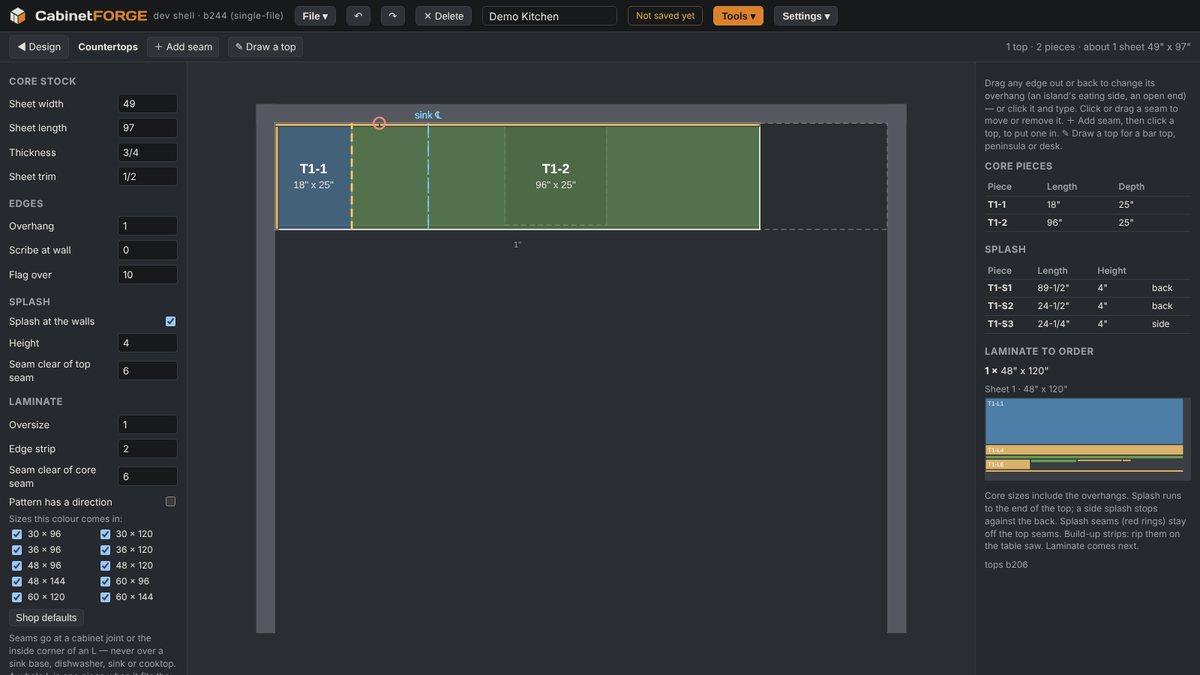
Working out laminate sheets and keeping seam rules straight should not take a separate spreadsheet. The countertop screen lays out the core pieces on your sheet size (49" × 97" to start), adds the back and side splash, marks the sink centre line, and keeps seams off sinks and openings.
Then it does the laminate: 1" oversize, seams kept 6" away from the core seams, pattern direction if your colour has one, and the sheet sizes that colour comes in. You see which laminate sheets to order before you quote the job.
3. Nesting, onion-skin cutting and G-code built in
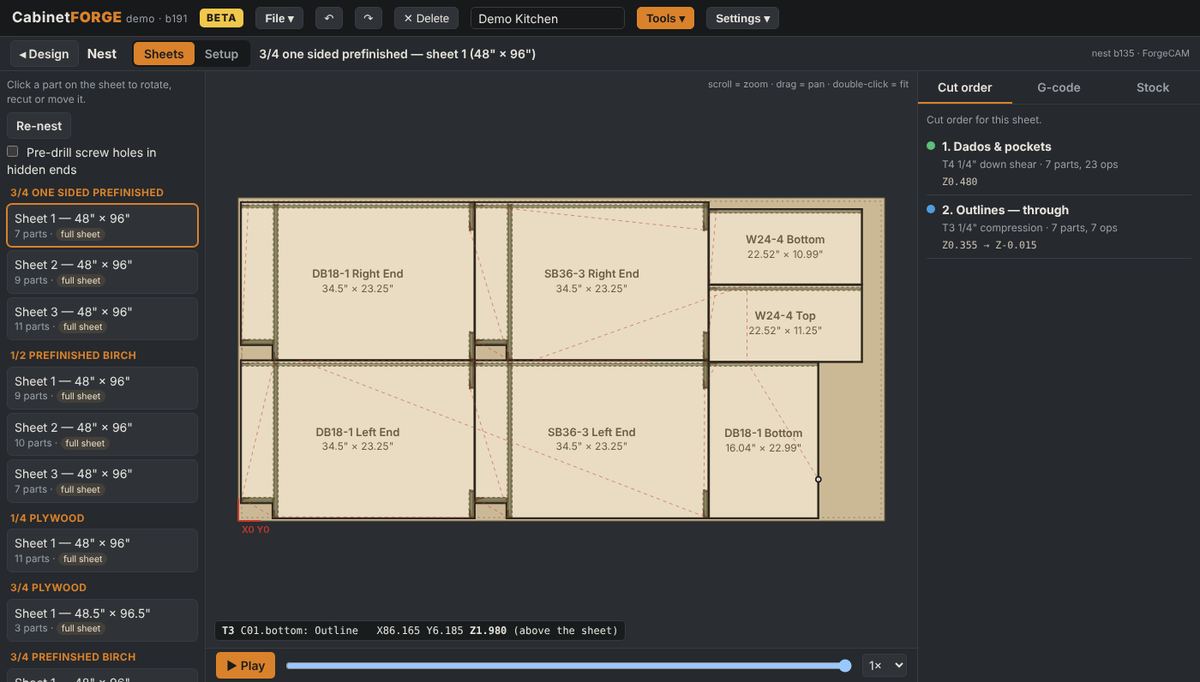
CabinetFORGE nests the parts by material, uses the remnants you tell it you have before it opens a new sheet, and puts the cuts in the order a shop wants them:
- Blind holes
- Dados and pockets
- Outlines, rough (leaving an onion skin)
- Outlines, release (at half feed)
- Outlines, through
It reads the same .pp post processor files many shops already have, and tells you in plain English what it found in yours. You can play the toolpath back on screen before you save the file. It prints part labels, and it will write a spoilboard resurfacing program too.
Every account comes with 3 seats. Put one in the office, one at the assembly bench for a paperless shop floor, and one on the computer at the router. Your jobs are saved online, so the change you made in the office is the job that opens at the machine. No thumb drives, and no cutting yesterday's version by mistake.
4. Built by a builder, and your price never goes up
Most cabinet software is owned by big companies with investors who expect a price increase every year.
CabinetFORGE is built by a working cabinetmaker, not a committee. It is a lean, independent operation. It runs in a browser without a pile of overhead behind it, so it does not need tens of thousands of customers, or constant price increases, to do well.
When you subscribe to CabinetFORGE, your price is locked for life. It will not go up. No surprise renewals, no charge per seat, and no holding your cabinet library hostage.
Join the end-of-November soft launch
Early access opens at the end of November 2026 for custom cabinet shops, CNC router owners and woodworkers who want a faster, fairer, all-in-one way to work.
- Want early access? Get on the list at cabinetforge.app, or write to info@cabinetforge.app.
- Want to try it first? The demo runs in your browser at cabinetforge.app/app. Nothing to install.
- Want to see it in person? Come find us at Wood Pro Expo Texas in Dallas, May 2027.
Does CabinetFORGE need to be installed?
No. It runs in a browser tab. There is no installer and no dongle.
Does it do both face frame and frameless cabinets?
Yes. Full overlay, half overlay and inset face frame, and frameless.
Can I use it without a CNC router?
Yes. Turn on "Butt joint, no dados" and print the cut list for the table saw.
Will it work with my CNC?
It reads .pp post processor files and writes G-code from them. Send your post to info@cabinetforge.app and I'll check it before you rely on it.
Does it estimate laminate countertops?
Yes. It lays out the core, the splash and the laminate, and shows the laminate sheets to order.
Will the price go up after I subscribe?
No. The price you subscribe at is locked for as long as you stay subscribed.
How many computers can use one account?
Three seats come with every account.
Get on the launch list
One email when CabinetFORGE is ready. Nothing else, and your address goes nowhere.